Thank you for your interest in Gig Performer Essentials.
Please enter your name and email address in the field below. Links for both Windows and macOS downloads will be sent to you.
By providing your email address, you will be subscribed to our newsletter from which you will be able to unsubscribe at any time. Make sure you use a valid e-mail address and if you don't receive our e-mail, please check your spam folder.
Dialog window
Gig Performer® 14-Day Free Trial
Thank you for your interest in Gig Performer.
Please enter your name and email address in the field below. Links for both Windows and macOS downloads will be sent to you.
By providing your email address, you will be subscribed to our newsletter from which you will be able to unsubscribe at any time. Make sure you use a valid e-mail address and if you don't receive our e-mail, please check your spam folder.
Gig Performer for Worship Musicians: Build Your Divine Rig
In this article, you will discover how Gig Performer can transform your keyboard setup into a powerful and expressive rig built for the unique demands of worship music.
In worship music, the keyboard is rarely just a keyboard. One moment, you might be playing a grand piano. A few bars later, you’re adding a warm pad underneath the guitar. Then comes a synth lead, a shimmering effect, an ambient texture, or a completely different layer for the bridge.
Contemporary worship music often relies on evolving textures, sustained sounds, atmospheric effects, and subtle changes that help support the song without drawing attention away from the worship experience.
That makes the keyboard player’s rig surprisingly demanding. This is where Gig Performer can make a big difference.
.
Easily shape your piano sound to match the atmosphere
. A piano sound that works beautifully on its own—or even in a rock band—may not be the best choice for contemporary worship. In CCM, the piano is often treated less like a traditional acoustic piano and more like another part of the overall sonic texture. Worship musicians frequently use heavier compression, reverb, ambience, and subtle synthetic layers to create a bigger, more atmospheric sound. In fact, a slightly “fake” or processed piano can sometimes work better than a realistic piano because it sits more naturally within the mix.
The piano may also double guitar lines or simple melodic parts, helping relatively simple musical ideas sound much bigger. In gospel music, it’s also common to layer acoustic pianos with electric pianos for additional warmth, punch, and character.
With Gig Performer, you can easily shape your piano sound to fit the particular song and the rest of the band. You can adjust compression, add effects, layer another instrument, or create completely different piano setups for different parts of the set.
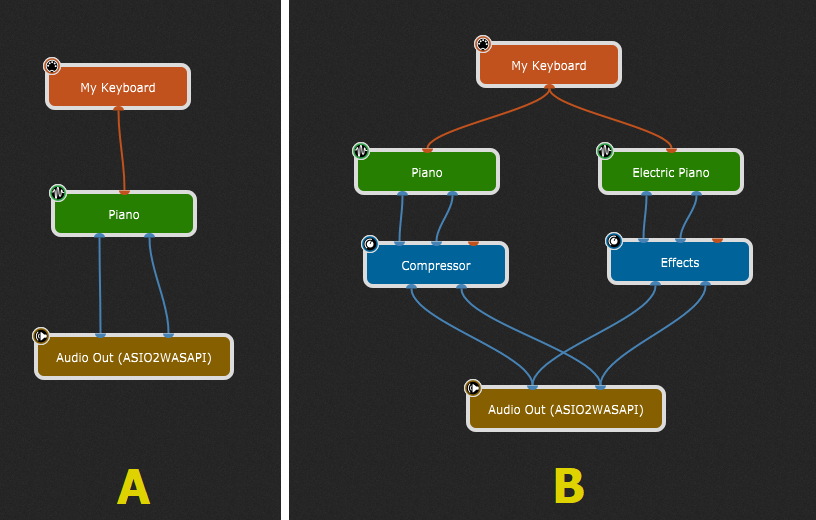
For example, Screenshot A shows a simple setup in Gig Performer. First, wire your MIDI controller to a piano plugin. Then wire the piano plugin to the audio outputs. That’s it! The piano plugin may already include its own effects, such as reverb, chorus, and more.
Screenshot B shows a simple piano and electric piano layer. We added a compressor to the piano and an effects plugin applied to the electric piano.
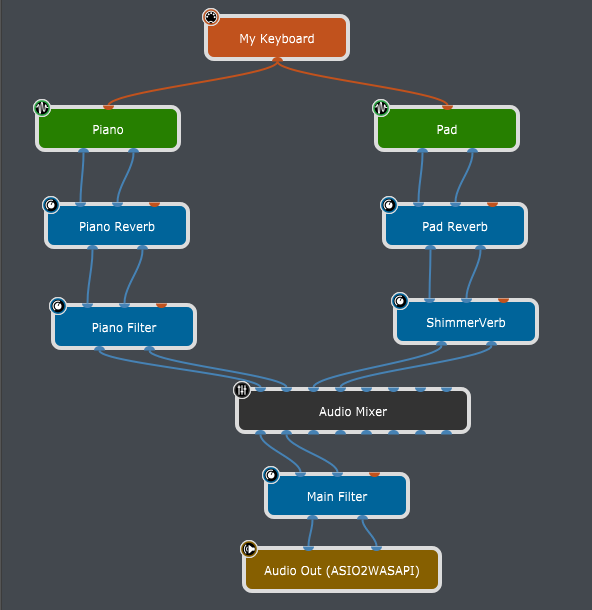
Gig Performer makes building setups like these incredibly intuitive with its graphical approach. You simply connect the blocks to create your signal chain. Whatever plugin chain you have in mind, you can build it quickly and easily. Want to add a third-party shimmer effect? Just drop it into the wiring diagram and connect it. Even more efficiently, if you hold the Shift key down and drag that shimmer effect between two audio blocks, the new effect will be inserted automatically. This approach gives you a clear overview of your entire patch while also giving you the flexibility to fine-tune every part of it to match your personal sound and playing style. .
Keep the worship flowing
.
One of the defining characteristics of contemporary worship music is that there is no silence between songs. Unlike a typical concert, where one song ends and the next begins after a pause, worship sets tend to flow continuously. An ambient pad, drone, or warm texture often carries the atmosphere from one song into the next. Sometimes the transition is so seamless that it barely feels like the song has changed at all.
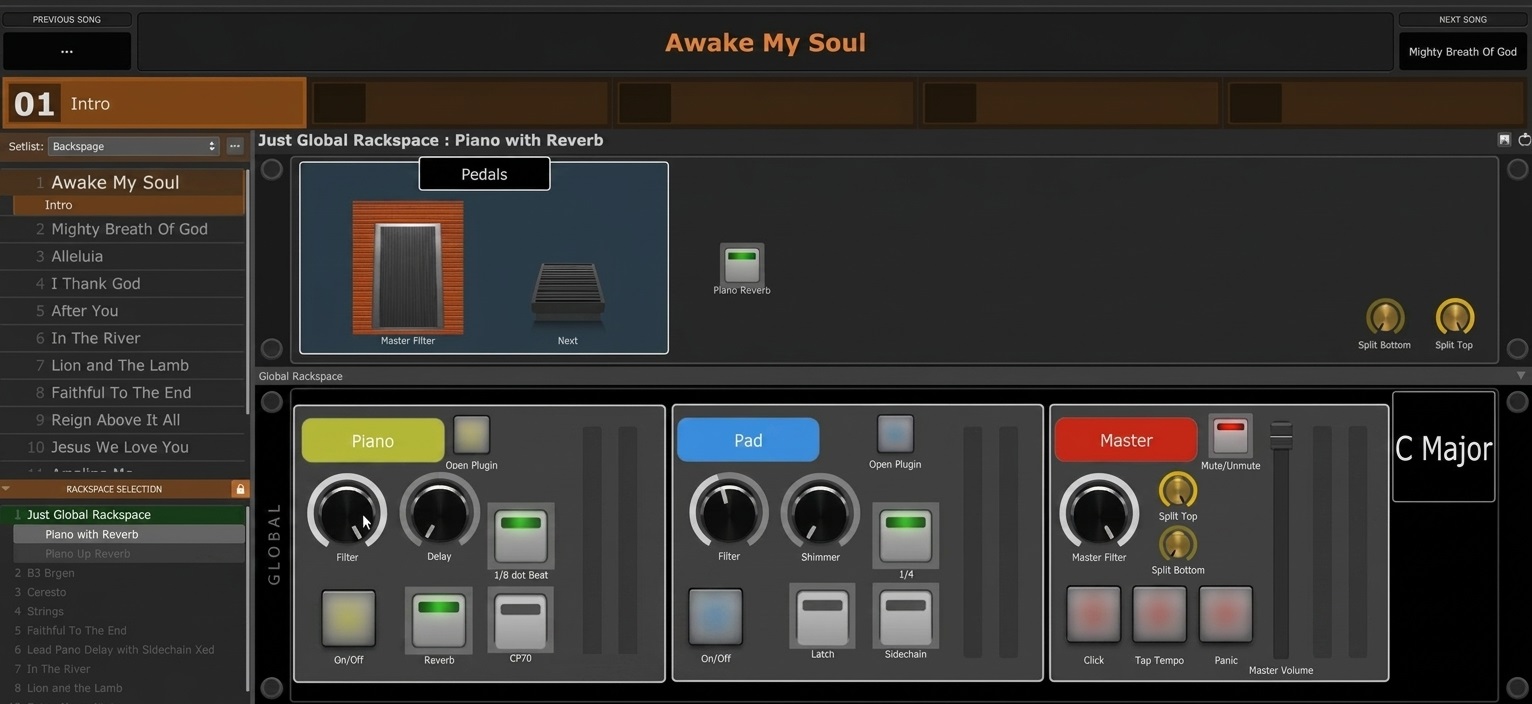
Gig Performer is particularly well suited to this style of performance thanks to its Global rackspace—an area of your setup that remains loaded and available throughout the entire performance. For many worship musicians, this is where the essential “bread-and-butter” sounds live, especially pianos and ambient pads that are used during most of the service.
You can then load song-specific sounds and more specialized plugin chains in individual rackspaces only when they’re needed for a particular song. This keeps the overall rig both organized and flexible.
That continuity becomes especially valuable during unpredictable moments in a service. The worship leader may extend a chorus, move into spontaneous prayer, begin reading Scripture, or simply create space for reflection. Instead of abruptly stopping the sound, you can instantly transition to a soft, warm pad at a lower volume and maintain the atmosphere without interrupting the flow. Combined with features such as Patch Persist, Gig Performer helps create smooth transitions between sounds so your performance feels natural, connected, and free from the abrupt changes that can break the mood. .
Unlimited sounds, layers, and freedom
. Another characteristic of contemporary worship music is the sheer number of sounds and parts that can be needed at the same time. It’s not unusual to see two keyboard players on a worship stage, with one focusing primarily on piano and the other handling pads, synths, and atmospheric sounds.
With a traditional hardware workstation, you’re often limited by the number of splits and layers the instrument can handle. With Gig Performer, you can create as many keyboard and velocity splits as your setup requires. (Click here to learn how)
You can also layer as many instruments as you need, giving you virtually unlimited possibilities for combining sounds.
And the complexity of modern worship arrangements can go much further. Look at the stems for some contemporary productions and you may find dozens of individual parts—20 guitar tracks, 10 keyboard parts, multiple synths, pads, effects, and more. Obviously, you can’t always reproduce all of that with your fingers alone. That’s where Gig Performer can help you expand what you can do from a single keyboard. You can incorporate backing tracks, layer multiple instruments, or use Chord Maker to trigger complex and expressive chords with a single key press. You can even trigger those chords from a foot controller, leaving both hands free to play.
And if your worship setup really does require two keyboard players, Gig Performer can accommodate that, too. Ableton Link lets you synchronize their tempos, while patch changes can be coordinated between their setups. Alternatively, you can run two independent instances of Gig Performer on the same computer. This gives each keyboardist a completely separate setup. .
All presented concepts are easy to understand
.
We interviewed Mike Lopez, a professional worship musician, who demonstrated how Gig Performer is a perfect fit for worship musicians.
His Gig Performer project file (or “gig file”) is also available for download here. You can see how he has organized his chains and layouts and get inspiration for building your own rig.
Next, in this episode of Backstage with Gig Performer, Brett Pontecorvo demonstrates his professional setup for performing worship music.
. Wrapping up
.
In worship music, you never quite know where the set will take you. You may have rehearsed every song, only to realize in the moment that a particular song doesn’t feel right. It can also happen that the worship leader decides to take things in a completely different direction. With Gig Performer, you’re never locked into the plan. You can switch to another song with a single click from your MIDI controller, change sounds on the fly, or adapt your entire setup to whatever you or your fellow musicians decide in the moment.
And what we’ve covered in this article is really just the beginning. You can trigger effects and samples to match the atmosphere. Further, you can automate actions as you move through different songs or song parts, and build a setup that responds to the way you perform. Whatever you can imagine doing with your rig, Gig Performer can make it happen.
For worship musicians, one keyboard can go a surprisingly long way with the right tools behind it. And sometimes, the best way to see what’s possible is to watch musicians who are already doing it.
To wrap things up, here’s a segment from the Worship & Warfare show featuring Don Potter and Steve Swanson. You can see Gig Performer running on Steve’s computer.
Take a look at what’s possible—and then go build your own divine rig.
If you have any questions or want to share your feedback, please check this Community thread.
Please share this article to help spread the word! 🙂
We use cookies to ensure that we give you the best experience on our website. If you continue to use this site we will assume that you are happy with it.