Thank you for your interest in Gig Performer Essentials.
Please enter your name and email address in the field below. Links for both Windows and macOS downloads will be sent to you.
By providing your email address, you will be subscribed to our newsletter from which you will be able to unsubscribe at any time. Make sure you use a valid e-mail address and if you don't receive our e-mail, please check your spam folder.
Dialog window
Gig Performer® 14-Day Free Trial
Thank you for your interest in Gig Performer.
Please enter your name and email address in the field below. Links for both Windows and macOS downloads will be sent to you.
By providing your email address, you will be subscribed to our newsletter from which you will be able to unsubscribe at any time. Make sure you use a valid e-mail address and if you don't receive our e-mail, please check your spam folder.
What are Software Instruments and Effects – First Things First
In this article, we break down software instruments and effects.
If you have spent your musical life playing hardware keyboards, synthesizers, or digital pianos, you have probably heard people talk about MIDI, software instruments, VST plugins, plugin hosts and DAWs. It can feel like you need a computer science or audio engineering degree just to make a sound!
The good news? The concept is actually very simple. Follow this article and you’ll be playing with virtual instruments in no time.
Think of software instruments and effects as the digital versions of the gear you’ve been using for years—except they live inside your computer instead of inside a keyboard or rack unit.
Let’s see what that means. .
What is a software instrument?
.
A software instrument (commonly called a virtual instrument or VST instrument) is simply a musical instrument that runs on your computer. (If you are a Mac user, you may have heard the term AU or Audio Unit, which is just Apple’s format for a virtual instrument)
So, instead of buying another hardware keyboard to get new sounds, you install software audio plugins that can recreate almost any instrument imaginable. Gig Performer is software that hosts and manages your instrument and effect plugins (a VST host) for live performance. Software instruments can emulate: grand pianos, vintage electric pianos, Hammond organs, analog synthesizers, orchestras, choirs, guitars, basses, drums, and countless other sounds.
Let’s try it!
To see how it works right out of the box, install Gig Performer and try the included templates. Gig Performer is a live performance host for virtual instruments and effects and comes with some included. To get you started, Gig Performer includes templates of complete example projects with virtual instruments and effects. .
Once downloaded, install it and start your free 14 day trial. Note: Virtually any PC (starting with Windows 7 and later) and Mac (starting from macOS 10.9) will work.
For a basic demo, you can just use your computer’s built-in sound card and speakers to hear the sounds.
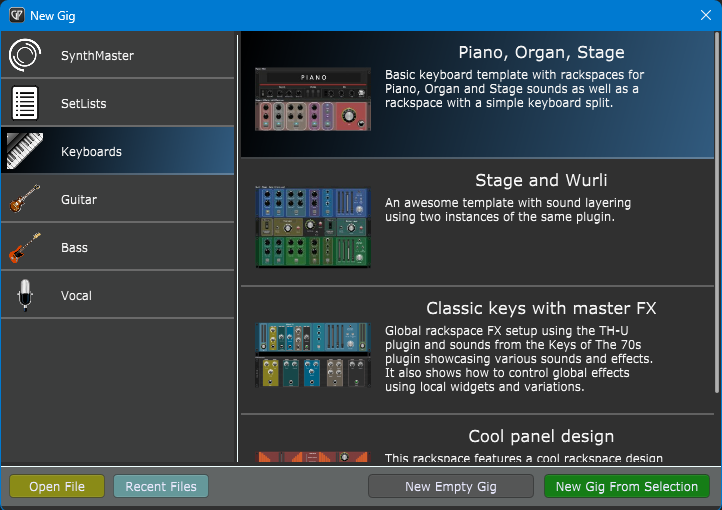
Then select a template, e.g. Piano, Organ, Stage in the Keyboards section:
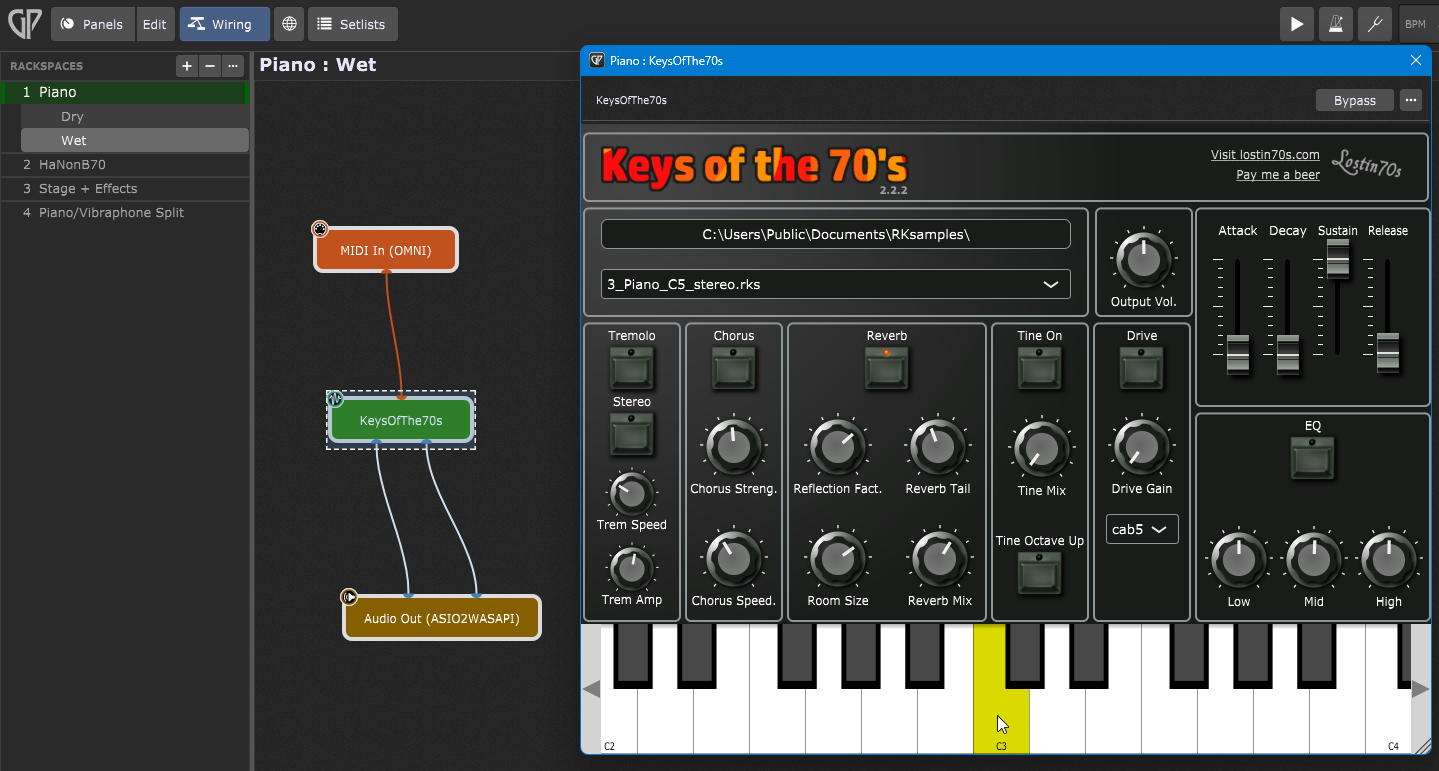
Click on the Wiring view then double-click the KeysOfThe70s block:
Click any note on the virtual keyboard with your mouse. You should be able to hear the sound.
Congratulations! You’ve successfully played a software instrument!
Now, if you connect your MIDI keyboard (we explored MIDI in an earlier article) you can play this software instrument with it. Feel free to explore various sections of this instrument and hear the results. In Gig Performer, software instruments are green blocks. .
What is a software effect?
.
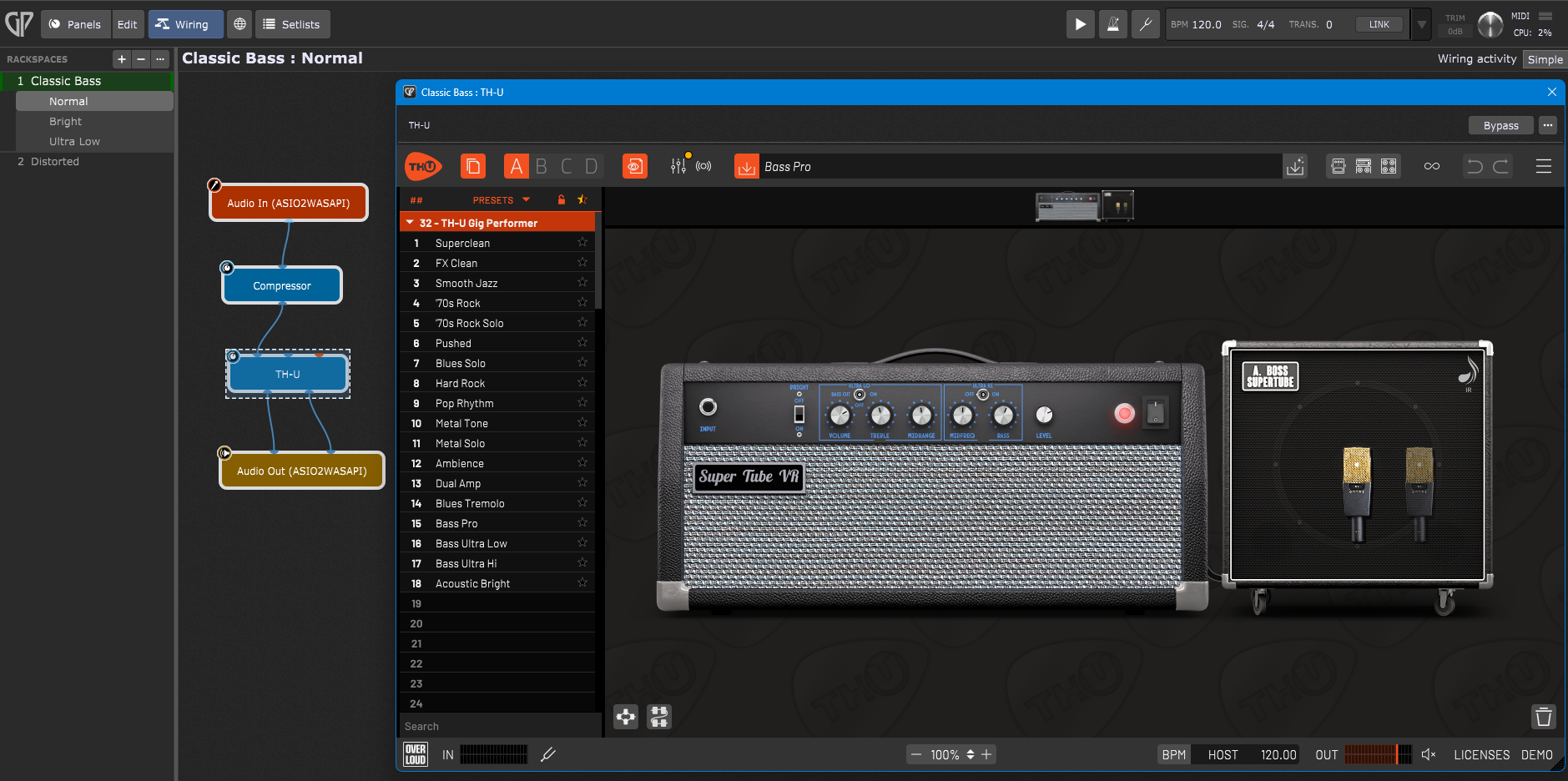
While software instruments generate new audio from scratch, software effects process and modify existing audio. Both operate as plugins inside a VST host, in this case, Gig Performer. Guitarists, bass players, and vocalists typically use software effects to shape their sound. For example, here is the Classic Bass template from the Bass section:
Click on the Wiring view and double-click on TH-U. You can adjust various aspects of your virtual amp by adjusting the knobs, just as you would do it on a real amp. Vocalists can apply various effects on their voice such as reverb, delay or Auto-Tune.
In Gig Performer, effects are blue blocks. .
Wrapping up
.
Software instruments and effects are expanding what’s possible. They give musicians access to thousands of world-class sounds and studio-quality effects without filling a room with hardware. And with an audio plugin host like Gig Performer, all of those instruments and effects become part of a single, dependable live performance system.
Whether you’re playing in church, touring with a band, performing in musical theater, or creating music at home, understanding software instruments is the first step toward building a setup that’s more flexible, more powerful, and ready for virtually any performance.
Instead of buying a physical, heavy grand piano or a massive wall of synthesizers, software instruments emulate these sounds inside your computer.
One of the biggest advantages of software instruments is freedom. You’re no longer limited by the sounds that came with your keyboard. Want a concert grand? Load one. Need a vintage Mellotron? Load one. Need an orchestra, Hammond organ, analog synth, and choir—all at the same time? You can build that entire setup inside Gig Performer, as easy as connecting various blocks with virtual wires.
As your musical needs grow, your collection of software instruments can grow with you.
Now that we explored software instruments and effects, in the next article, we’ll create a patch from scratch and control it using a MIDI controller.
FAQ .
What is a “VST”?
When people talk about software instruments and effects, they almost always use the word plugin or VST. “VST” stands for Virtual Studio Technology. Introduced by Steinberg in 1996, it is simply the standard file format that allows these instruments and effects to talk to your audio software. Note: If you are on a Mac, you may also see AU or AudioUnits, which is Apple’s equivalent format. Which one is better? Click here to find out.
So what is a VST host?
VST plugins (i.e. software instruments and effects) don’t run by themselves. They need an application that loads them, connects them together, and routes audio and MIDI between your instruments, controllers, and speakers. That application is called an audio plugin host. Think of it as mission control for your entire virtual rig. Gig Performer’s graphic interface paradigm makes it very easy to connect various instruments and effects blocks with virtual wires.
Can I use my hardware keyboard and software instruments together?
You may ask whether you need to replace your keyboard with something more advanced? Not at all. In fact, many musicians keep using the keyboard they already own. The keyboard simply becomes the controller, while the computer generates the sounds. This approach is often called a hybrid rig because it combines the familiarity of hardware with the flexibility of software.
This video demonstrates many concepts that live performers use to build a hybrid rig:
It’s one of the main reasons more and more live performers are embracing computer-based setups.
If you have any questions or want to share your feedback, please see this Community thread.
We use cookies to ensure that we give you the best experience on our website. If you continue to use this site we will assume that you are happy with it.